Hi Vladimir
I am installed fine using new downloads, thank you!
But i cannot follow the ilcstage instructions for setting up IIS. The XP dialogues are very different, there is not the number of options in control panel/add remove programmes/add remove windows components as in vista so i dont know if i have this correct also despite having .net framework 3.5 installed i have no record of it in my intermgr dialogue only the default app pool.
Any help for installing onto XP 64bit much appreciated.
TIA
XP instructs
591479 views at snapshot time; this count no longer increments.
Here are some instructions, however the problem is that I haven't currently XP system on which I coud try it (actually the problem is time ...).
Please feel free modify the document. In any case please let me know if the setup was working for you.
Thanks!
Hi Vladimir
Thanks for taking the time to make these instructions.
I have followed them but there are still some problems and i get page under construction messages from iistart.htm and default.asp ( incidentally there is typo on page 8 of iLCstage.pdf, 2 different spellings for iistart - iisstart)
I cant even open the pages directly in firefox or IE and they open blank in Dreamweaver. Some paths are wrong and i will investigate further.
Maybe time to upgrade to Win7?
Saul Greenberg
You are welcome! I forgot, for XP you have to go to firewall settings and enable the WWW, it should be port 80.
With Win7 there are some troubles with LinkEditor, the background is not refreshed properly. It is not tS bug fortunatelly, but I'm not sure if SP1 will cover the fix. All other is working fine.
OK i am getting closer.
There are a few more steps in setting up iis in XP that i was missing i will amend your instructions to reflect this.
I have managed to open: http://localhost/ICStageAsp/default.asp as per your instructs.
but when i follow instructions to load the icbullinput obj into LE i get this error message on web page:
Microsoft VBScript runtime error '800a01ad'
ActiveX component can't create object: 'ICStage.RiICStage'
/ICStageAsp/CScene.asp, line 204
Seems the asp is not working or the ICStage is not registered. First try to:
- start tS and put an ICStage object into LE
- open command prompt and execute e.g. "test ObjectDesc.js" (the file should be here .\trueSpace761\ICStageAsp\test ObjectDesc.js) To execute it just type script name and hit enter
- an error may appears, but if it is working fine, you will find log file: C:\a.txt which will contains at least "Objs: 7"
If this will work, then the problem is really only in the IIS, probably in rights. I attached another IIS settings, hope it help
Thanks again Vladimir
No C:\ a.txt file is generated and i get following error. I will try the Asp settings.
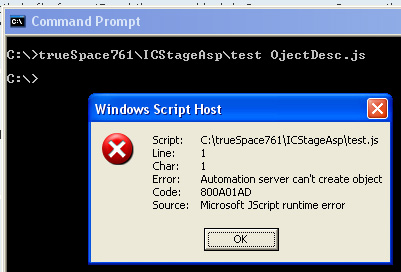
Please try to use regsvr again to be sure the plugin is registered. Close tS, open cmd prompt and type this:
regsvr32 c:\trueSpace761\ICStage.dll
If the operation will be successful, try again the test. If it fail again, then there is a problem ... I remember I had such situation but can't remember what it was ... Something was missing in the XP system, may be it was a script support, really can't remember